I accidentally deleted important photos and videos from my SD card, and now I’m trying to recover the files before they’re gone for good. I’m looking for the best SD card recovery software that actually works, is safe to use, and can recover deleted or lost files quickly. Any advice or recommendations would really help.
Hey, I went through this once with a camera card, and the first move is boring but important. Stop using the SD card now. Pull it out of the phone or camera and leave it alone. Deleted files usually are not gone on the spot. The card marks the space as open, and new data stomps over the old stuff if you keep shooting or copying things.
Paying a recovery lab is rough on the wallet, so I’d start at home with recovery software. I tested a pile of them over time, and the one I kept coming back to was Disk Drill. It worked for me on jobs where the easy tools came up empty. It runs on Windows and Mac, and I didn’t need to babysit the interface to get through a scan.
Where it helped me most was camera media. A lot of recovery apps do fine with simple files, then fall apart on RAW photo formats like CR2, CR3, ARW, or NEF. Same story with large video files from GoPros, drones, and mirrorless cameras. Those clips often get split into chunks across the card. Some programs find the pieces but fail to rebuild them into a file you can play.
Disk Drill includes an Advanced Camera Recovery mode for this kind of mess. That part matters if your footage comes back broken in other apps. You can scan the card for free and preview what it finds. On Windows, it also recovers up to 100 MB for free, which is enough to test whether the scan found the right stuff before spending money.
If you want other routes, here’s the short list I’d look at.
- R-Photo
If you only care about photos and videos on Windows, this one is a good free pick for personal use. I liked the thumbnail view because you see what you’re pulling back instead of guessing by filenames. It won’t help with documents, PDFs, or mixed file recovery. For media, though, it punches above free.
- Recuva
This is the old reliable for basic file recovery on Windows. Free, easy, fast enough. I’d use it only when the card still looks healthy and the file system isn’t wrecked. If the SD card shows up as RAW, acts corrupted, or holds more complicated camera files, it tends to miss the mark.
- DiskGenius
This one feels built for people who don’t mind a crowded screen and too many options. It doubles as a partition tool and a recovery app, and its FAT32 support is useful since most SD cards use FAT32. I wouldn’t hand it to someone who wants a clean beginner setup. Also, the free version has a tiny 64 KB recovery limit, so full-size photos are basically out unless you pay.
- DiskDigger
If you’re stuck on Android and don’t have a computer nearby, this is one of the few names worth mentioning because it has a native Android app. I still think a PC is the better route when you have one. The desktop version allows free recovery, but the wait between saving files gets old fast. I tried it once and, yeah, patience helps.
A couple things before you scan.
If the SD card looks like it’s failing, random disconnects, read errors, freezing your machine, make an image of the card first if your software supports it. I did this with a sketchy card once because every extra read felt risky. Disk Drill and DiskGenius both support byte-for-byte imaging. You scan the image file instead of hammering the damaged card over and over.
And don’t save recovered files back onto the same SD card. That’s how you overwrite the data you’re trying to recover. Save everything to your computer or an external drive. Use a card reader if you have one. It usually makes the process less flaky. Good luck, hope you get at least most of it back.
1 Like
I’d rank them like this for deleted SD card photos and videos.
-
Disk Drill
Best all-around pick if you want the highest recovery rate with the least hassle. It handles exFAT and FAT32 well, previews files before recovery, and does a better job than most apps with fragmented video. If your card came from a camera, drone, or phone, this is the first one I’d try. @mikeappsreviewer mentioned it, and I agree on the result side. I disagree a bit on the free tier being enough for testing, 100 MB goes fast with video files. -
PhotoRec
Ugly interface. Strong recovery engine. Free. Open-source. It ignores the file system and searches by file signatures, which helps when the card looks empty or damaged. Downside, filenames and folder structure are often gone. If you care more about getting files back than keeping them organized, it works. -
R-Studio
Better for tougher cases than beginner tools. Good if the SD card has partition issues, bad sectors, or weird read behavior. It costs more and feels more technical, but the scan quality is solid. -
UFS Explorer
This is my “last home attempt” option before a lab. Expensive, less friendly, but strong with damaged media and custom scans.
My advice, skip junk freeware first. Some of it recovers thumbnails and calls it a win, lol. Use a card reader, scan to another drive, recover to another drive. If the card disconnects, image it first.
For a quick visual guide, this SD card recovery walkthrough for deleted photos and videos covers the basics pretty well.
If you want one name, best SD card recovery software for most people is Disk Drill. If Disk Drill misses stuff, run PhotoRec after it. That combo gets used a lot for a reaosn.

I mostly agree with @mikeappsreviewer and @sognonotturno, but I’d tweak the order a bit. For straight-up deleted SD card photos/videos, the best SD card recovery software is usually Disk Drill first, then something more brute-force if that misses files.
Why I’d put Disk Drill first:
- cleaner for normal people
- solid SD card support
- previews are actually useful
- better at sorting recoverable stuff without making you dig through total garbage
Where I kinda disagree with the “just use free tools first” idea: sometimes free apps waste time and give you a messy pile of partial files. If the photos matter, I’d rather do one proper scan first than bounce between 4 mediocre tools. Time matters because people get impatient and start reusing the card. bad move.
My order:
- Disk Drill for best balance of safety, recovery quality, and ease
- PhotoRec if the card is really messed up and you don’t care about filenames
- R-Photo if it’s Windows-only and mostly photos
- R-Studio if you’re comfortable with more technical stuff
Also, if the card mounts weirdly or keeps disconnecting, don’t keep hammering it. That’s when home recovery starts getting dicey.
If you want a community take, this thread on best SD card recovery software recommended by Reddit users is worth skimming.
One more thing people forget: if the files were deleted from inside the camera after new shots were taken, recovery odds can drop fast. So yeah, stop using the card ASAP. Kinda boring advice, but it’s the one that saves your butt most often.
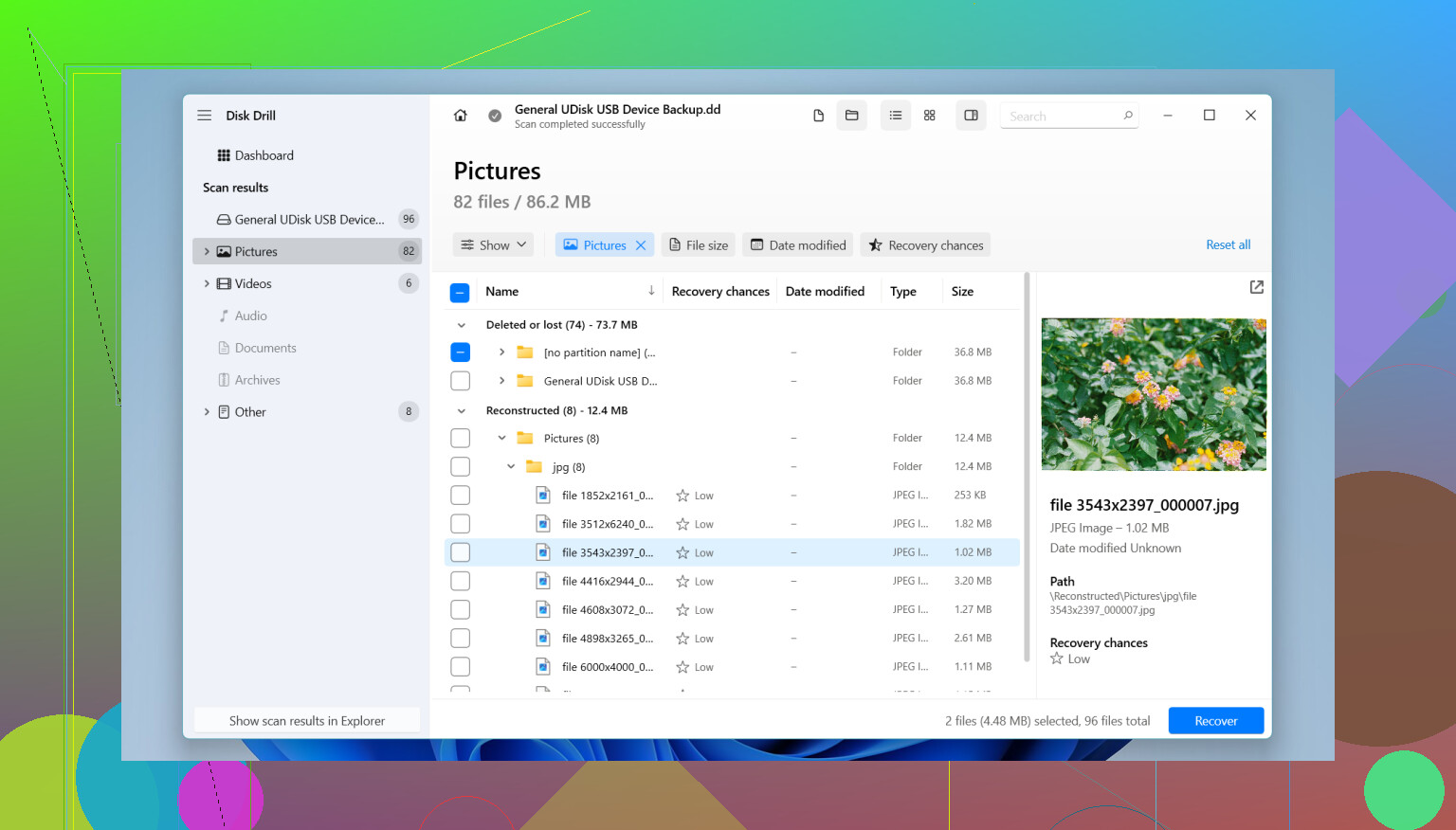
Hot take: I would not start with PhotoRec unless the card is basically chaos. @sognonotturno, @codecrafter, and @mikeappsreviewer all pointed to solid options, but for most people the smartest first pass is still Disk Drill.
Why Disk Drill goes first
- easy previewing, which matters when you need to confirm the right photos/videos are still there
- handles common SD card formats well
- good at separating deleted files from current junk
- less intimidating than R-Studio or UFS Explorer
Disk Drill pros
- beginner-friendly
- scans SD cards, microSD, camera cards well
- useful previews before recovery
- can create a disk image if the card is unstable
- decent support for photo and video recovery in one app
Disk Drill cons
- free recovery is limited
- deep scans can take a while
- not the cheapest option
- on badly damaged cards, dedicated pro tools can still outperform it
My actual recommendation:
- Deleted files, card still readable: Disk Drill
- Card is corrupted / RAW / directory gone: PhotoRec or R-Studio after that
- Windows-only and mostly images: R-Photo is worth a look
- Card keeps disconnecting: stop testing software and image the card first
One thing I disagree with a bit: “best” is not only recovery rate. If a tool recovers 5,000 nameless fragments, that’s not always a win. Usability matters. That is why Disk Drill is usually the best SD card recovery software for normal users, even if a more technical tool might squeeze out a few extra files in edge cases.