I’ve been using Walter Writes AI for content and copy, but the pricing is getting hard to justify for my small projects. I’m looking for a reliable free alternative that offers similar features like long-form writing, blog posts, and maybe basic SEO help. What free tools or workflows are you using that can realistically replace Walter Writes AI without killing quality or taking way more time?
1. Clever AI Humanizer Review
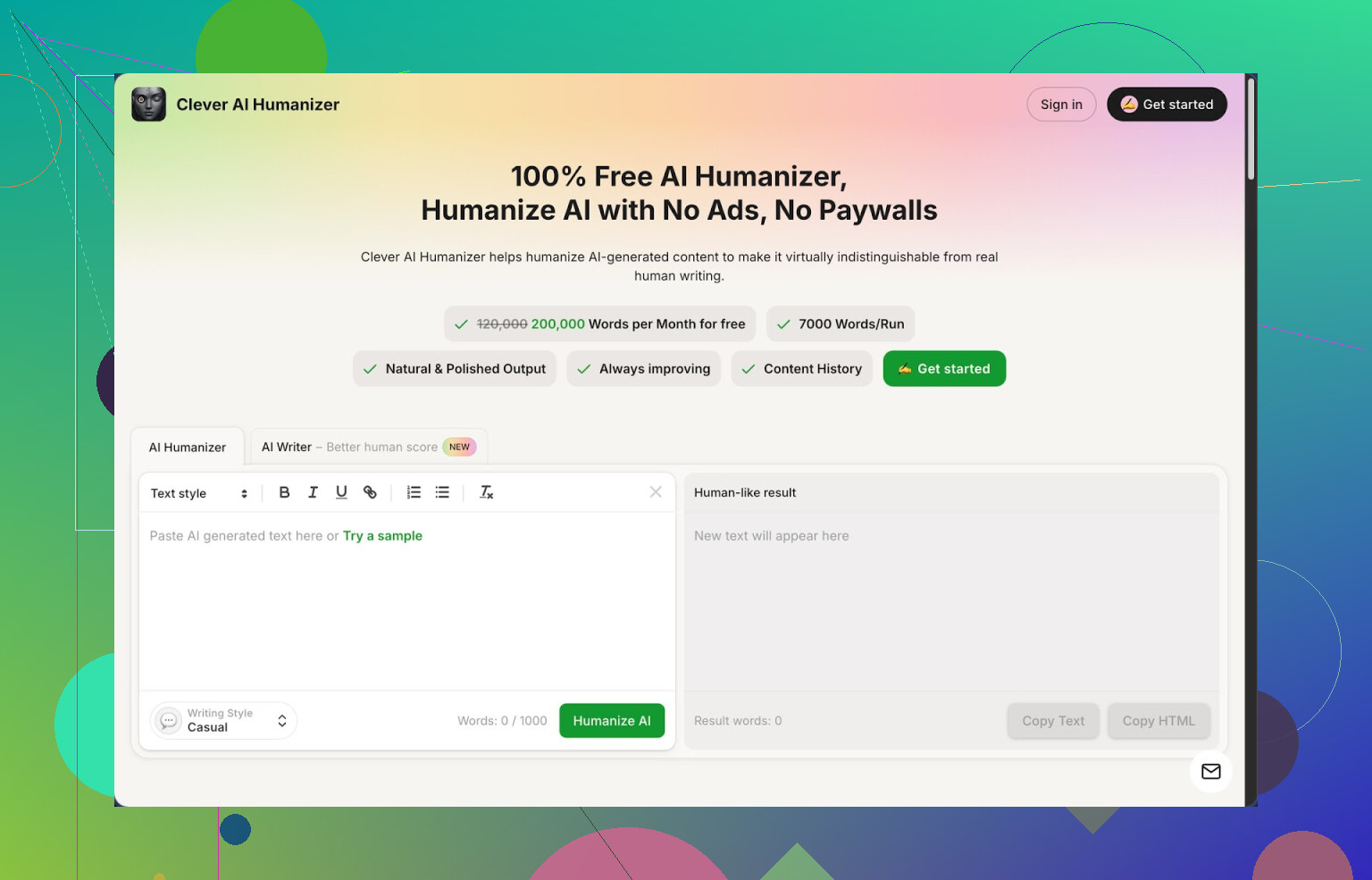
I ran into Clever AI Humanizer here:
https://cleverhumanizer.ai
After a week of using it on real stuff, not test lorem ipsum, here is what I found.
First thing that stood out for me was the pricing, or more like the lack of it. The tool gives you up to 200,000 words per month, with a single run limit of 7,000 words. No credit system, no “starter” tier. For people who write long reports, research notes, or client docs, this limit is enough for steady use.
You get three styles to pick from:
- Casual
- Simple Academic
- Simple Formal
There is also a built in AI writer so you can generate and humanize inside one page.
I fed it three different longform samples that I had originally written with another AI model. All three were run through the “Casual” style, then tested on ZeroGPT. For those runs, ZeroGPT showed 0 percent AI. That surprised me more than I expected because I am used to “humanizers” failing half the time and getting flagged anyway.
I am not saying it will always show 0 for you. Detectors change a lot and they use different signals. I am only saying what happened with those specific pieces.
Let me walk through how the main parts behave in actual use.
Free AI Humanizer module
I pasted in whole sections from a technical article, picked Casual, hit the button, then waited a few seconds. The output kept the structure and key points, the claims, the numbers, the citations. What changed was:
- Shorter sentences in spots where my AI draft had long chains of commas
- Slightly less formal phrasing
- Some filler cut out
- More variation in word choice without going into weird synonyms
Meaning stayed consistent as far as I could see. I compared paragraph by paragraph in a diff tool. No big shifts, no missing arguments. For serious work, I still checked every paragraph, but at least I was not fixing broken logic.
The word limit per run made it easier to push whole sections from a report instead of slicing them into tiny pieces. That is where many other tools slow you down.
AI Writer module
The “Free AI Writer” is a basic generator. You type a topic, short description, or prompt, then it produces a draft that you can send directly through the humanizer inside the same interface.
I tried this with:
- A 1,500 word blog post on password managers
- A 1,000 word explainer for a non technical client
The raw AI Writer output felt like standard model text, a bit flat, predictable transitions, some padding. After running it through the humanizer in Casual and Simple Academic, both versions scored better on detectors and also read closer to how I write when I am tired but still awake.
If you like to use AI for first drafts and then edit, this combo shortens the first pass. You still need to trim and add your own examples.
Grammar Checker
The Free Grammar Checker is simple but handy if you write fast and sloppy. I pushed a rushed email and a product update note through it. It handled:
- Spelling
- Consistent punctuation
- Fixes for some clunky phrasing
It reminded me of standard grammar tools, nothing fancy, but the useful part is that it sits in the same interface as the humanizer and writer. So you are not jumping between three different tabs.
Paraphraser
The Free AI Paraphraser focuses on rewriting while keeping meaning. I used it for:
- Rewriting a support article for a slightly different target audience
- Changing tone from stiff corporate to plain English
- Creating alternative wording for similar FAQ entries
It did not mangle the facts. The paraphrased versions were longer in some places, shorter in others, but content stayed aligned. This is useful when you want variation for SEO or to reuse the same point in a different context without sounding like a copy paste.
Workflow and interface
The main benefit for me was having four tools in one place:
- Humanizer
- AI Writer
- Grammar checker
- Paraphraser
You get a simple “paste, pick style, run” flow. No wild layout, no requirement to sign up for a paid trial to see output. For daily writing, that matters more than one extra niche setting.
Practical use cases where it helped me:
- Cleaning up AI generated outlines before sending them to a client
- Rewriting parts of a research summary so it does not trigger basic detectors in internal tools
- Paraphrasing older blog posts into fresh newsletters
- Fixing grammar on quick updates without leaving the site
What did not work perfectly
It is not magic. A few points worth knowing:
- Some detectors will still flag the text as AI. There is no tool that beats every detector, every time. You should always expect mixed results across platforms.
- Text length tends to grow a bit after humanization. The tool often adds small connectors and extra wording to break up AI like patterns. So if you are trying to stay under a word limit, you need to trim manually.
- Style presets are basic. If you want highly specific voices, like “legal brief with regional nuance” or “academic in a narrow field”, you must do extra editing.
Despite those issues, for a tool that is free at the level of 200k words a month, the tradeoff feels fine if you are using it as part of a workflow instead of pressing one button and walking away.
If you want more detail, there is a longer breakdown here, including screenshots and detector results:
https://cleverhumanizer.ai/community/t/clever-ai-humanizer-review-with-ai-detection-proof/42
There is also a YouTube review here, for those who like watching instead of reading:

If you want to see what others are using or comparing, these Reddit threads helped me check alternatives and feedback:
Best AI humanizers discussion:
https://www.reddit.com/r/DataRecoveryHelp/comments/1oqwdib/best_ai_humanizer/
General talk about humanizing AI output:
https://www.reddit.com/r/DataRecoveryHelp/comments/1l7aj60/humanize_ai/
If you write a lot with AI and you are tired of wrestling with word caps and paywalls, this one is worth trying on your own text and running through your usual detectors before you rely on it.
1 Like
If Walter Writes AI feels steep for small stuff, you have a few decent free paths.
First, on what you asked for, long‑form + blogs + basic copy:
-
Clever Ai Humanizer
Mike already went deep on it, so I will not repeat his workflow. I see it more as a combo tool than a 1:1 Walter replacement, but it works if you adjust your process a bit.Practical way to use it as a “free Walter” setup:
- Use the built‑in AI Writer to get the rough article, email, ad, or landing copy.
- Humanize it in Casual or Simple Formal for web or client‑facing text.
- Run the Grammar Checker on the same page to clean it.
- If you need variants for A/B tests, send chunks through the Paraphraser.
Strengths:
- 200k words per month is plenty for small projects.
- Long‑form is fine. I pushed ~2k word posts in two chunks without issues.
- Works well for blog posts, newsletters, basic sales pages, SOPs.
Weak spots:
- You will not get super tailored brand voice without editing.
- It sometimes inflates word count a bit, so trim if you write for tight limits.
- I do not fully agree with @mikeappsreviewer that detector results should matter much for normal marketing work. For client work, clarity and accuracy matter more than “0% AI” readings.
-
Pair it with a free planner
Walter is nice because it guides structure. To replace that, bolt on free planning tools:- Use a basic outline approach before you touch any AI:
- H1: main topic
- 3–5 H2s
- 2–3 bullet points under each H2
- Then feed each section into Clever Ai Humanizer’s AI Writer or Humanizer, section by section. This keeps your article focused so you do not get fluffy rambles.
- Use a basic outline approach before you touch any AI:
-
Where Clever Ai Humanizer works best vs Walter
Use Clever Ai Humanizer if:- You write:
- Blog posts 1k–2.5k words
- Product descriptions
- Email sequences
- Short ebooks or guides
- You want:
- Free words instead of strict credits
- Quick “AI to human” cleanups for client deliverables
Stick to Walter or similar paid tools if:
- You need:
- Heavy SEO tooling baked in
- Team features and content calendars
- Brand voice libraries for multiple clients
- You write:
-
Simple workflow you can try today
For a blog or long landing page:- Draft a 10–15 line outline yourself.
- Generate each section with the AI Writer inside Clever Ai Humanizer.
- Humanize all sections in one or two runs.
- Grammar check once at the end.
- Final manual edit for hook, CTA, and headlines.
This setup will not mirror Walter’s “all‑in‑one SaaS” feel, but for zero dollars it covers long‑form writing, blog content, and general copy with decent quality, as long as you accept a bit more manual control.
If Walter’s pricing is punching you in the wallet, you’re not crazy for looking elsewhere.
I mostly agree with @mikeappsreviewer and @mike34 on using Clever Ai Humanizer, but I don’t really see it as “just a humanizer addon.” Used right, it can stand in for Walter for small solo projects, especially if you don’t need heavy SEO tools or team features.
What I’d do differently from what they suggested:
-
Treat Clever Ai Humanizer as your main writer, not only as a cleanup pass.
The built‑in AI Writer is basic, yeah, but for smaller blogs, emails, simple landing pages, it’s enough if you:- Write tight prompts (who it’s for, length, goal, tone)
- Generate section by section instead of whole 3k word monsters in one go
-
Use the styles very intentionally:
- “Casual” for blogs, newsletters and social copy
- “Simple Formal” for landing pages, proposals, product pages
- “Simple Academic” for explainer posts and long‑form where you want a bit more structure
-
Don’t obsess over detectors as much as @mikeappsreviewer did. For client or marketing content, what actually matters:
- Clear structure
- Correct info
- A voice that doesn’t sound like a robot on NyQuil
Detector scores are nice to have, not the main KPI.
Rough workflow that keeps you close to the Walter experience, without copying what’s already been described:
-
Brain dump your outline in a notes app or doc.
H1, 3–6 H2s, and bullets under each. Super rough is fine. -
For each H2:
- Paste the bullet list into Clever Ai Humanizer’s AI Writer
- Ask for ~300–500 words, specify your audience and purpose
- Pick the style that fits and generate
-
Once the full draft is done:
- Paste big chunks into the Humanizer in the style you’ll actually publish in
- Run the Grammar checker once at the end on the full piece
-
For copy-heavy stuff:
- Headlines / hooks: regenerate several versions then paraphrase them inside Clever Ai Humanizer for quick variants
- CTAs: same trick, short lines through the Paraphraser to get multiple options
Where Clever Ai Humanizer really helps vs Walter for small projects:
- Big monthly word allowance without you babysitting credits
- Handles long‑form by splitting in 2–3 runs, not 20
- Keeps everything (drafting, cleaning, paraphrasing) in one place so you are not juggling 4 different freebies
Where I honestly still think Walter or a paid setup wins:
- Detailed SEO briefs, keywords, internal link planning
- Stable brand voice across several clients
- Content calendars and collaboration
So if your “small projects” are mostly solo blogs, simple sales pages, email sequences, short guides, I’d park Walter for now and ride Clever Ai Humanizer as your main stack. You’ll have to take on a bit more manual planning yourself, but you won’t be paying monthly just to generate another 1,200 word blog post on “5 tips for X” that an unpaid tool can handle just fine.