I used Decopy AI Humanizer to rewrite some AI-generated content so it would sound more natural, but the results felt inconsistent and a few sections still read like AI. Now I’m trying to figure out if I’m using it wrong or if others had the same experience. Looking for an honest Decopy AI Humanizer review, feedback on content quality, and tips for getting better humanized writing.
Decopy AI Humanizer
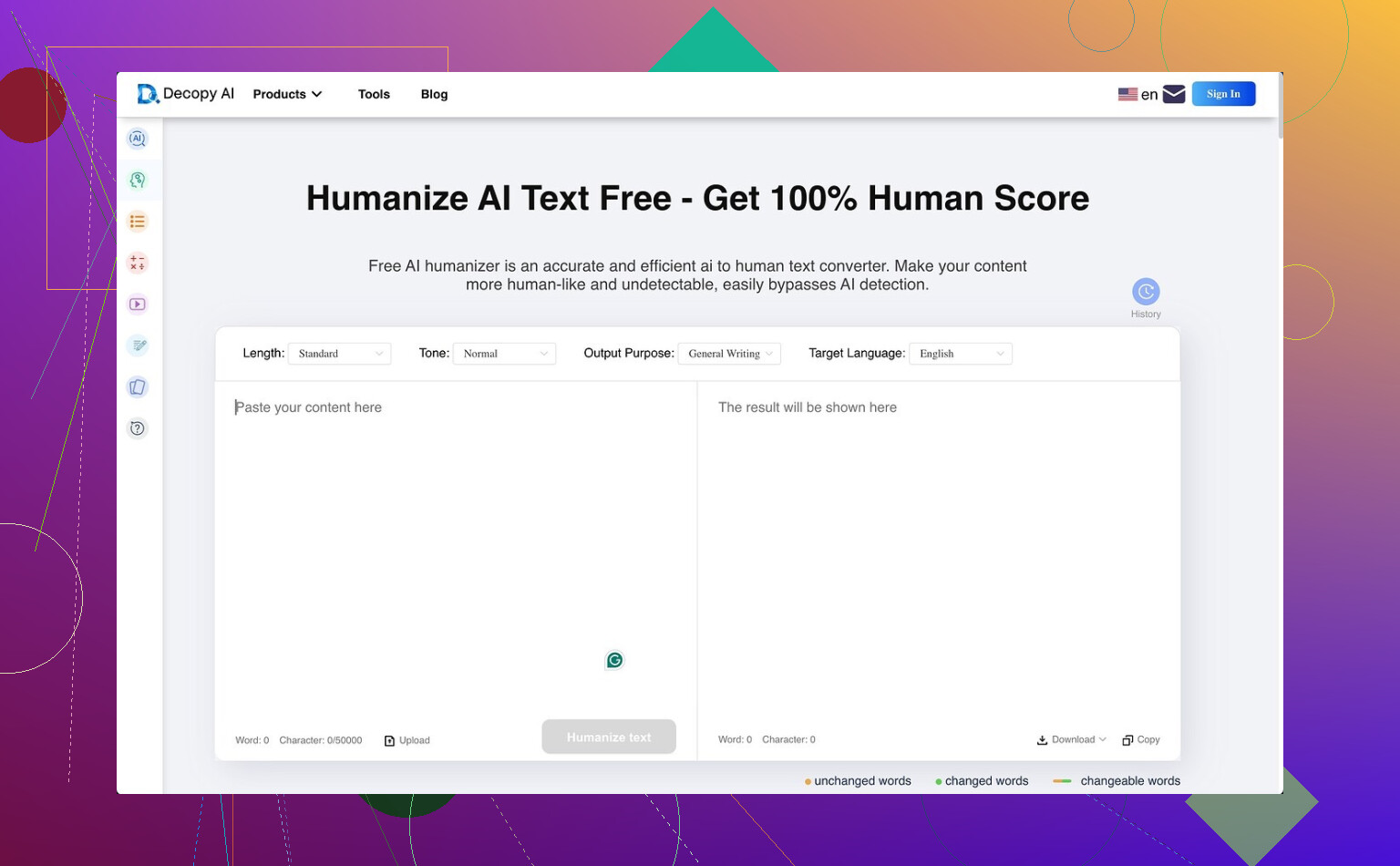
I spent some time with Decopy AI Humanizer, and on paper it looks generous. You get 500 free runs, and each request goes up to 50,000 characters. For a free tool, ths is a lot. It also gives you eight tone options, nine purpose presets, and a sentence-by-sentence redo tool, which I liked more than I expected. If one line comes out weird, you can rerun only tht part instead of trashing the whole result.
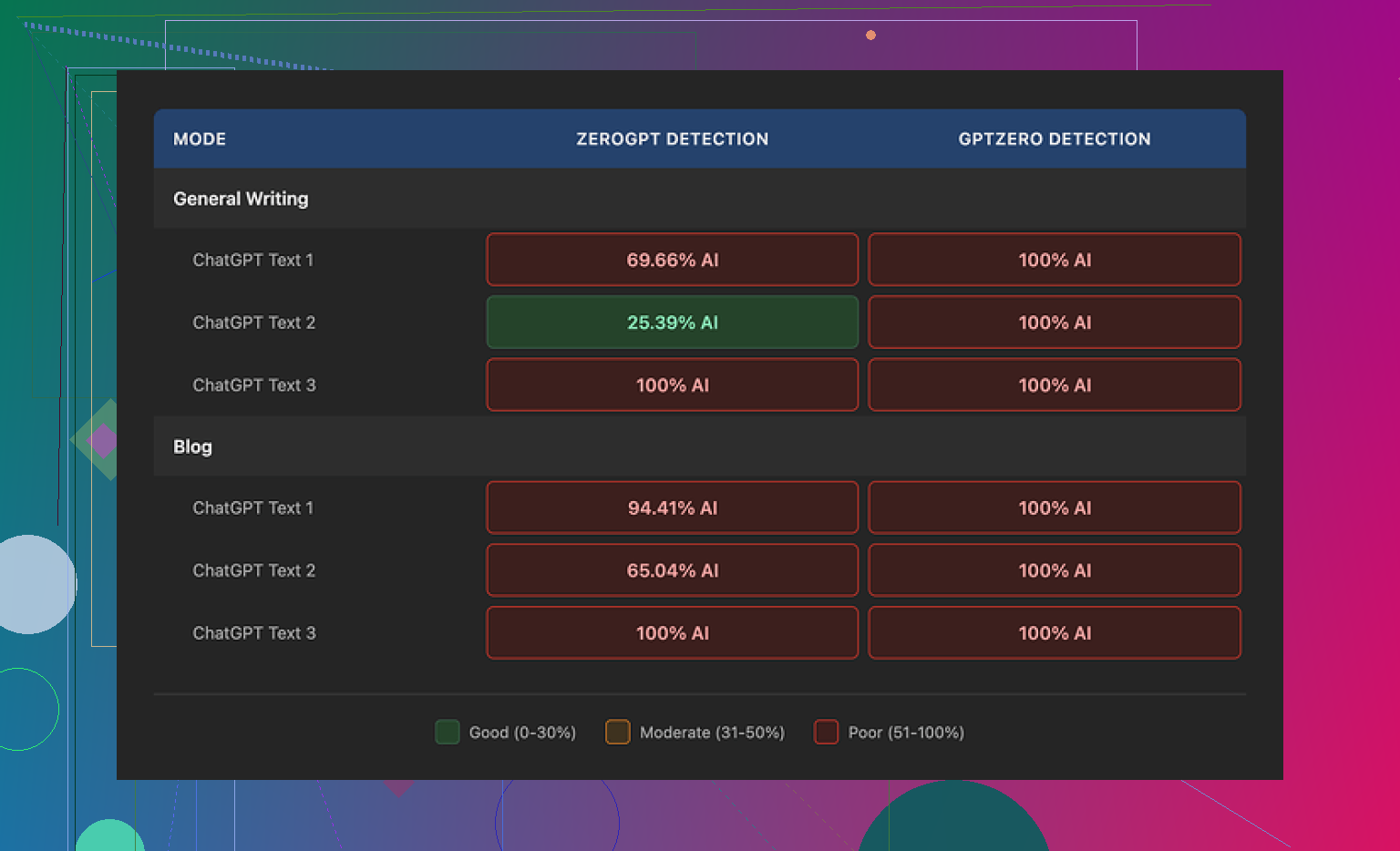
The problem showed up fast in testing. The extra options did not help with AI detection. GPTZero flagged every output as 100% AI in both General Writing and Blog mode. ZeroGPT moved around more, roughly 25% to 100% depending on the sample, so the results were less fixed there, but still not good if your goal is getting past detectors.
One thing I noticed, Decopy usually keeps the grammar clean. It does not wreck sentence structure or add random mistakes the way some other tools do. In tht sense, it feels more stable than stuff like UnAIMyText and HumanizeAI.io. I’d put Blog mode around 7/10 for readability, and General Writing a bit higher, maybe 7.5/10.
Still, the writing style has a big flaw. It simplifies too hard. Blog mode felt like it was written for a small kid. General Writing was a little better, though it still dropped in phrases like ‘digital stuff’ and ‘totally changing tech,’ which sound off if you want normal adult writing. I did notice it usually kept close to the original length, so at least it doesn’t shrink your text into a stub.
The privacy section is clearer than I expected. It says data is retained for three months, and it claims GDPR and CCPA compliance. What I did not find was a clean explanation of what happens to the text you paste in for rewriting. For me, tht part matters more than the compliance badges.
After putting it next to other tools in the same test setup, Clever AI Humanizer came out stronger on the humanization side, and it did not cost anything either.
1 Like
You’re not using it wrong. Decopy is inconsistent by design, or at least it felt tht way when I tested similar text blocks.
A few things helped me get cleaner output:
- Feed it smaller chunks. Try 150 to 300 words, not full articles.
- Pick one tone and stick with it. Switching presets tends to make the voice uneven.
- Rewrite the intro and ending yourself. Those parts get flagged first.
- Use the sentence redo tool on lines with stiff phrasing. Don’t rerun the whole piece.
- Add specifics after rewriting. Dates, numbers, examples, personal wording.
I differ a bit from @mikeappsreviewer on one point. I don’t think detector scores tell the whole story. Some outputs still read fine to humans even if a detector screams AI. The bigger issue is Decopy often flattens your voice and swaps in childish phrasing. Ths is why parts still feel fake.
My rule, use it for rough cleanup, then do a manual pass. If you want publishable copy, Decopy alone isn’t enough.
You’re probably not using it wrong. Decopy’s issue, at least from what I saw, is less “bad settings” and more “surface-level rewriting.” It swaps words, smooths grammar, and changes rhythm a little, but it often keeps the same thought pattern underneath. That’s the part detectors and actual readers still catch.
I partly disagree with @mikeappsreviewer and @cacadordeestrelas on the detector angle, though. Sometimes the output can score badly and still be usable if your audience is just normal readers. But if you can still feel the robotic sections, that usually means the rewrite didn’t go deep enough.
What helped me more than changing tones was changing the source before humanizing it. If the original AI draft is too clean, too balanced, and too generic, Decopy just gives you a polished version of the same problem. Kinda lipstick on a toaster tbh.
A better test:
- make the draft less symmetrical first
- add a clear opinion or bias
- vary paragraph lengths a lot
- insert one or two oddly specific details
- then run only the stiff sections through Decopy
Also, if a sentence sounds “correct” but not like somone would actually say it, cut it. That’s usually where the fake feel sticks around. Decopy is decent for cleanup, not magic for voice.
I’d frame Decopy AI Humanizer like this: not broken, just shallow.
Where I slightly disagree with @cacadordeestrelas and @yozora is that chunk size and pre-messing-up the draft are not always the main fix. Sometimes Decopy actually performs worse when the source already has awkward rhythm, because it “normalizes” it into bland copy. So if your input is half decent, the tool can sand off the only human bits you had left.
What helped me more was this:
- compare output against your own old writing, not detector scores
- keep a short banned-phrases list and replace Decopy’s usual filler manually
- read it aloud once, because AI-ish wording shows up faster by ear than on screen
- preserve one strong opinion per section so the rewrite does not go full neutral-corporate
Pros for Decopy AI Humanizer:
- generous free usage
- clean interface
- sentence-level redo is useful
- grammar usually stays intact
Cons:
- voice can get generic fast
- tone presets feel cosmetic
- some lines come out weirdly juvenile
- still leaves obvious AI cadence in places
I think @mikeappsreviewer, @cacadordeestrelas, and @yozora all got part of it right. Decopy is okay as a polishing layer, not a real voice builder. If your goal is readable copy, it can help. If your goal is convincing human texture, you still need to rewrite the “too neat” parts yourself.