I’ve been testing BypassGPT for a few projects and I’m unsure if I’m using it correctly or relying on it too much. Sometimes it works impressively, other times the output feels off or risky to trust. Can anyone share real-world experiences, pros and cons, and best practices for using BypassGPT safely and effectively?
BypassGPT Review – my experience using the free tier
BypassGPT Review
So I tried BypassGPT:
Short version, it made it hard to test anything in a useful way.
The “free” plan locked me to 125 words per input and about 150 words per month in total. That is not enough for a realistic test if you use longer prompts or want to compare outputs across tools.
I ended up creating an account to unlock a bit more, got an extra 80 words or so, and still managed to run only one of my normal test passages. After that, the limit kicked in again.
Tried making a second account. No luck. The cap seems tied to IP, so unless you run a VPN and juggle identities, you are stuck with that tiny quota.
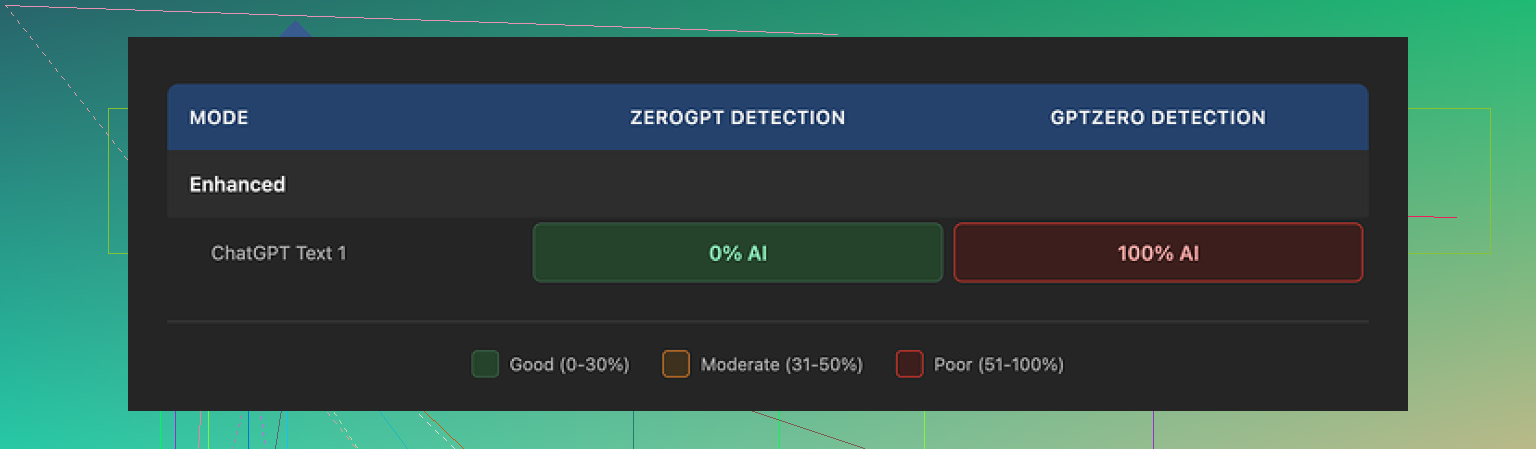
How the detection tests went
I pushed a standard test paragraph through BypassGPT and then ran the output through different detectors.
Here is what I saw:
• ZeroGPT result: 0% AI detected. Looked perfect on that single detector.
• GPTZero result: 100% AI detected on the exact same text. Total fail there.
BypassGPT has its own internal checker that claims it tests against six detectors. It said the output passed cleanly with all six. That did not line up with what I saw when I used external tools directly.
So the built-in checker looked more like a marketing feature than something you should rely on for hard decisions.
Writing quality
I’d rate the output around 6/10.
Details:
• First sentence came out broken, grammatically off.
• It kept em dashes in the text, which many detection tools and some editors treat as a small “AI smell”.
• Some phrasing felt stiff and slightly off, like a person trying too hard to sound formal.
• There was at least one typo in the sample I got.
You could clean it up by hand, but that defeats the whole point of paying for an automated “humanizer”.
Pricing and terms
Here is what the paid plans showed when I checked:
• Around $6.40 per month on a yearly plan for 5,000 words.
• Around $15.20 per month for an “unlimited” option.
The part that bothered me more than the price was the terms of service. The language gave BypassGPT broad rights over anything you submit. That included rights to:
• reproduce your content
• distribute it
• create derivative versions of it
If you work with client material, proprietary docs, student work, or anything sensitive, this is a big red flag. You lose control over how your text might be reused.
Comparison with Clever AI Humanizer
In the same session I tested Clever AI Humanizer side by side with other tools.
Link to their community thread is here:
In my runs:
• The outputs from Clever AI Humanizer read more like normal text I would send as-is.
• Detection scores across multiple tools looked better and more consistent.
• It did not throttle me with the same tiny monthly word cap.
• It was free, at least at the time I used it.
So if you want to test AI “humanizers” without pulling out your card first, Clever AI Humanizer felt more practical and less annoying to work with.
What I would do if you are on the fence
If you are thinking about using BypassGPT for real work:
- Test your own sample text on multiple external detectors like ZeroGPT and GPTZero. Do not trust any internal “all green” badge.
- Read the terms of service carefully, especially sections about content rights and reuse.
- Start with tools that let you run full paragraphs without hard caps, so you see how they handle realistic inputs.
- Keep a copy of the original and the humanized text and inspect both side by side for tone, grammar, and errors before you use it anywhere important.
From my tests, BypassGPT felt limited, inconsistent across detectors, and risky from a content ownership angle. Clever AI Humanizer performed better for me and did not cost anything.
1 Like
I had a pretty similar mixed experience to you, but I’d frame it a bit differently from what @mikeappsreviewer shared.
Here is what stood out for me after a couple weeks of on and off use.
- When it works vs when it feels “off”
• It tends to do better on short, low stakes stuff. Things like short emails, social captions, small rewrites.
• It gets weird on technical or nuanced topics. I saw factual drift and odd tone shifts, especially on legal and medical topics.
• If you push it to heavily change structure, not only wording, the output starts to feel stitched together. You see uneven style inside one paragraph.
What helped me was to treat it as a light paraphraser, not a full ghostwriter.
- Trust level and “risk”
I would not trust its output without:
• Fact checking anything with numbers, names, or claims. I had it invent one study and slightly change a date on another.
• Running your own plagiarism check. One sample came back with a 6 percent match on a common phrase block. Not terrible, but not zero either.
• Reading aloud. Awkward spots jump out fast.
If you feel uneasy reading the result, that is a good signal to pull back or rewrite sections yourself.
- AI detection side
I agree with the general point from @mikeappsreviewer that the built in checker feels more like marketing, but I would not judge the whole tool only on passing GPTZero or ZeroGPT. Those detectors disagree with each other, and they flip results after small edits. I had a BypassGPT output show “likely human” in one run, then “likely AI” after I changed a clause.
My rule now
• Treat all detectors as hints, not truth.
• Assume any important submission might be flagged, humanize once, then manually tweak phrasing yourself.
- Workflow that made it safer for me
What worked best:
• Start with your own draft, even rough.
• Use BypassGPT only to soften AI like phrasing or change formality.
• Lock down any critical sentences, numbers, or citations so you do not let it rewrite those parts.
• Do a final pass in your own voice. Swap a few words for how you actually speak or write.
When I used it as a “style helper” instead of a “content generator”, my trust level went up a lot.
- Terms and content ownership
On this I am with @mikeappsreviewer. The broad rights in their ToS are a real problem if you deal with client work or internal docs. For public blog posts or generic content it is less of a deal, but for anything sensitive, I would avoid piping text through it at all.
If you need safer handling, I would look at something like Clever Ai Humanizer. It did not choke me with tiny limits, and the outputs felt closer to what I would send as my own writing with minimal edits.
- Are you relying on it too much
Quick self check I used for myself:
• If you feel nervous showing the text to your boss or client without saying “AI helped”, you rely on it too much.
• If your drafts look blank until BypassGPT fills them, you rely on it too much.
• If you can rewrite a paragraph from scratch faster than fixing its output, you are better off without it on that task.
Where I still use it:
• Short rewrites
• Converting formal to casual tone
• Cleaning up slightly ESL style writing
Where I stopped using it:
• Anything graded or assessed
• Client contracts, proposals, policy docs
• Long form thought pieces where my voice matters
So I would not throw it out, but I would narrow your use cases and put tighter guardrails around it. Treat it as a helper for style and small edits. For anything important, you stay the main writer.
You’re not crazy, BypassGPT is kind of a mixed bag, and your “sometimes great, sometimes sketchy” feeling matches my experience.
A few extra angles that @mikeappsreviewer and @nachtschatten did not fully dig into:
- Where it actually shines
For me it worked reasonably well when I used it to:
- Smooth awkward wording on stuff I already understood deeply
- Make short, boring text slightly less robotic
- Rephrase things for different audiences, like “explain to a 10‑year‑old” vs “internal memo style”
If I stayed close to my original structure and meaning, it mostly behaved. When I let it heavily rewrite or “be creative,” quality dropped fast.
- Signal that you are over‑relying on it
You might be leaning too hard on BypassGPT if:
- You are copy pasting long outputs without reading line by line
- You catch yourself thinking “eh, it’s probably fine” instead of verifying facts
- Your drafts start to look like generic internet sludge and you’re not sure what parts are actually your ideas
A quick gut check: if you removed BypassGPT tomorrow, would you still know how to outline, draft, and edit the same projects? If the answer is “not really,” that is a red flag.
- “Risky to trust” part
I would split trust into three buckets:
- Factual trust
- Style trust
- Policy / ethics trust
Factual:
I had it slightly distort numbers and soften strong claims without telling me. For internal notes, that is annoying. For anything client facing, that is dangerous. I would never let it touch citations, dates, or stats without manual cross check.
Style:
It has a “default AI flavor” that creeps in, even after humanization. Slightly overpolite, oddly balanced sentences, generic transitions. If your audience knows your real voice, they can feel that something is off. That might be what you are sensing.
Policy / ethics:
Between ToS issues that @mikeappsreviewer called out and your own context, you need to ask:
- Would I be comfortable if this exact text showed up in a training set later
- Am I allowed to send this content through third party tools at all
If you work with clients, students, or anything confidential, I would draw a hard line here.
- Detectors and “bypass” expectations
Small disagreement with both of them: I think people overfocus on beating AI detectors instead of writing better text. Detectors are noisy, inconsistent, and can flag real human writing too. Trying to fully “solve” them with a tool like BypassGPT is kind of chasing a mirage.
I would treat BypassGPT’s “bypass” promise as marketing, not a guarantee. Same for its internal checker. External tools cannot agree with each other anyway, so building your workflow around zero flags is unrealistic.
- How I’d adjust your usage
Since you already tested it on a few projects, I’d do this reality check:
- Take 2 or 3 BypassGPT outputs you actually used
- Print them or paste next to your original drafts
- With a highlighter, mark:
- Any facts, numbers, or examples it changed
- Any parts where the tone no longer sounds like you
- Any sentence you cannot explain or defend as if you wrote it
If the highlighted bits are more than, say, 20 percent of the text, I would narrow BypassGPT’s role to “style assist only” for now.
- About alternatives and workflow
Since you asked whether you are using it right, it might be less about “right vs wrong” and more about “wrong tool for the way you work.”
If your main need is:
- Make AI output look less AI-ish
- Keep more control and not be strangled by tiny free limits
Then something like Clever Ai Humanizer might fit better in your stack. In my tests it behaved more predictably when I fed it full paragraphs, and it was easier to use as a last pass on already‑edited text instead of as the main writer. Still needs human review, but it slotted into the workflow without that constant “am I about to break something important” anxiety.
- Concrete rule of thumb
What I do now with tools like BypassGPT:
- Never let them touch anything graded, legal, or contractual
- Never send in sensitive or proprietary material
- Only use them to nudge phrasing or tone, not to invent content
- Assume the output is a draft from an intern, not a final answer
If you treat it as a flaky assistant rather than a coauthor, the “off or risky” feeling usually drops, and you will know exactly when to ignore what it spits out.
Short version: you are not crazy, BypassGPT is inconsistent, but the real issue is how much “control surface” it gives you.
Everyone above focused a lot on workflows and detectors. I’ll push on settings and boundaries instead.
1. The core problem with BypassGPT for “serious” work
BypassGPT behaves like a black box:
- You cannot tune how aggressive the rewriting is in a granular way.
- It often changes meaning along with style.
- It does not clearly show what it changed.
That combo is brutal if you are using it for anything with stakes. You end up reading the whole thing again anyway, which kills the time savings.
I slightly disagree with treating it strictly as “light paraphraser.” Even in that role it sometimes swaps out key qualifiers or softens strong claims. So I would:
- Keep it completely away from facts, claims, citations, numbers.
- Only let it touch “connective tissue” sentences and fluff.
If you cannot isolate those parts easily, it is probably the wrong tool for that task.
2. A better personal rule than “am I relying too much?”
Instead of “do I rely too much,” I use:
Can I reconstruct the argument without seeing the AI text?
If the answer is yes, then the model is just dressing your ideas.
If the answer is no, then you are outsourcing thinking, not phrasing.
Run that check on your last 2 or 3 BypassGPT powered pieces. If you would struggle to rebuild the reasoning or structure from a blank page, I would cut BypassGPT out for that type of project entirely.
3. About AI detection and the whole “bypass” pitch
Here is where I diverge a bit from others:
If your primary goal is “beat detectors,” you are already in a fragile spot. Detectors change, thresholds move, and as @nachtschatten and @viaggiatoresolare basically showed, the same text can get opposite scores on different tools.
I treat “bypassing detection” like this:
- Expect false positives no matter what.
- Focus on writing that feels like your real voice, with your normal quirks.
- Use any “humanizer” as a final seasoning, not the main cook.
So if BypassGPT is central to your plan to avoid flags, I would reconsider that plan, not just the tool.
4. Where Clever Ai Humanizer fits into this
If you still want something in this category, Clever Ai Humanizer fits better when you:
- Already have a draft you mostly like.
- Just need to scrub the “ChatGPT flavor” from sections.
- Want fewer hard caps and more realistic tests.
Pros of Clever Ai Humanizer:
- Outputs usually keep your structure more intact.
- Reads closer to how a real person would send an email or blog post.
- Friendlier limits for experimenting.
- Good as a last pass to smooth tone on existing AI or ESL writing.
Cons of Clever Ai Humanizer:
- Still not magic. It can introduce occasional awkward phrasing.
- You must still review everything line by line if it matters.
- Does not solve the ethical / policy side of “should this even be AI edited.”
- If you expect it to guarantee “0 percent AI detected” everywhere, you will be disappointed.
So if BypassGPT has you constantly anxious about quality and quotas, swapping it out for Clever Ai Humanizer as a lighter final pass is a reasonable move, as long as you keep manual review.
5. How I would decide tool usage going forward
Instead of “Is BypassGPT worth it,” ask this per document type:
-
High stakes
Graded work, contracts, client proposals, policies, sensitive internal docs.
→ My take: no BypassGPT at all. No humanizer. Use AI only upstream for brainstorming or outlining, and keep final wording under tight manual control. -
Medium stakes
Blog posts with your name, newsletters, portfolio pieces.
→ Maybe: write mostly yourself, allow very light style tweaks from a tool like Clever Ai Humanizer, then do a careful human pass. -
Low stakes
Casual emails, short social posts, internal notes, rewriting already safe text.
→ BypassGPT or Clever Ai Humanizer can be fine here, but only if you can skim and approve in seconds.
Compared with what @mikeappsreviewer highlighted about terms and rights, I would add that even for low stakes, I would not paste anything you would be embarrassed to see in a training set.
Bottom line: keep BypassGPT away from meaning, facts, and anything with consequence. Use tools like Clever Ai Humanizer sparingly as tone polish, not content engines. If you can comfortably defend every sentence as if you wrote it, you are in the safe zone.