I accidentally deleted photos from my Canon camera SD card before backing them up, and I really need to recover them. These pictures are important, and I’m looking for the best photo recovery method or software that works for deleted Canon SD card images without causing more data loss.
I’ve watched people make this worse in about five minutes flat, so first thing, stop using the card. If you deleted photos on a Canon, the files are often still sitting there for a while. The problem starts when you keep shooting, poke around in menus, or let some device write new data onto the card. One new image is enough to wipe out part of what you want back.
What I’d do first
Freeze the situation. No experiments.
- Do not take another photo. Not a test shot. Not one “to check.” New writes ruin old data.
- Do not try fixing it in the camera. Scrolling around, changing stuff, retrying things, none of it brings deleted files back.
- Do not format the card. If your computer pops up a format prompt, cancel it.
- Pull the SD card out now. If it has the little lock switch on the side, slide it to read-only. Then leave it alone till you’re at a computer.
Why deleted photos sometimes come back
Canon cameras don’t keep a trash folder. When you delete a photo, the card usually marks the space as free. The photo data often stays there until something new lands on top of it. So the image is gone from view, not always gone from the card. Once overwritten, though, it’s done. I’ve seen people lose whole shoots by taking “only a couple more pics” after the delete. Bad move.
Check the easy place before running recovery
If you use image.canon on your phone, open it and look there first. Sometimes there’s a cloud copy hanging around for up to 30 days. If nothing shows up, move to recovery software.
Use a computer and a USB SD card reader. I would skip plugging the Canon into the computer with a camera cable. A plain card reader tends to be the cleaner route.
Recovery tools worth trying
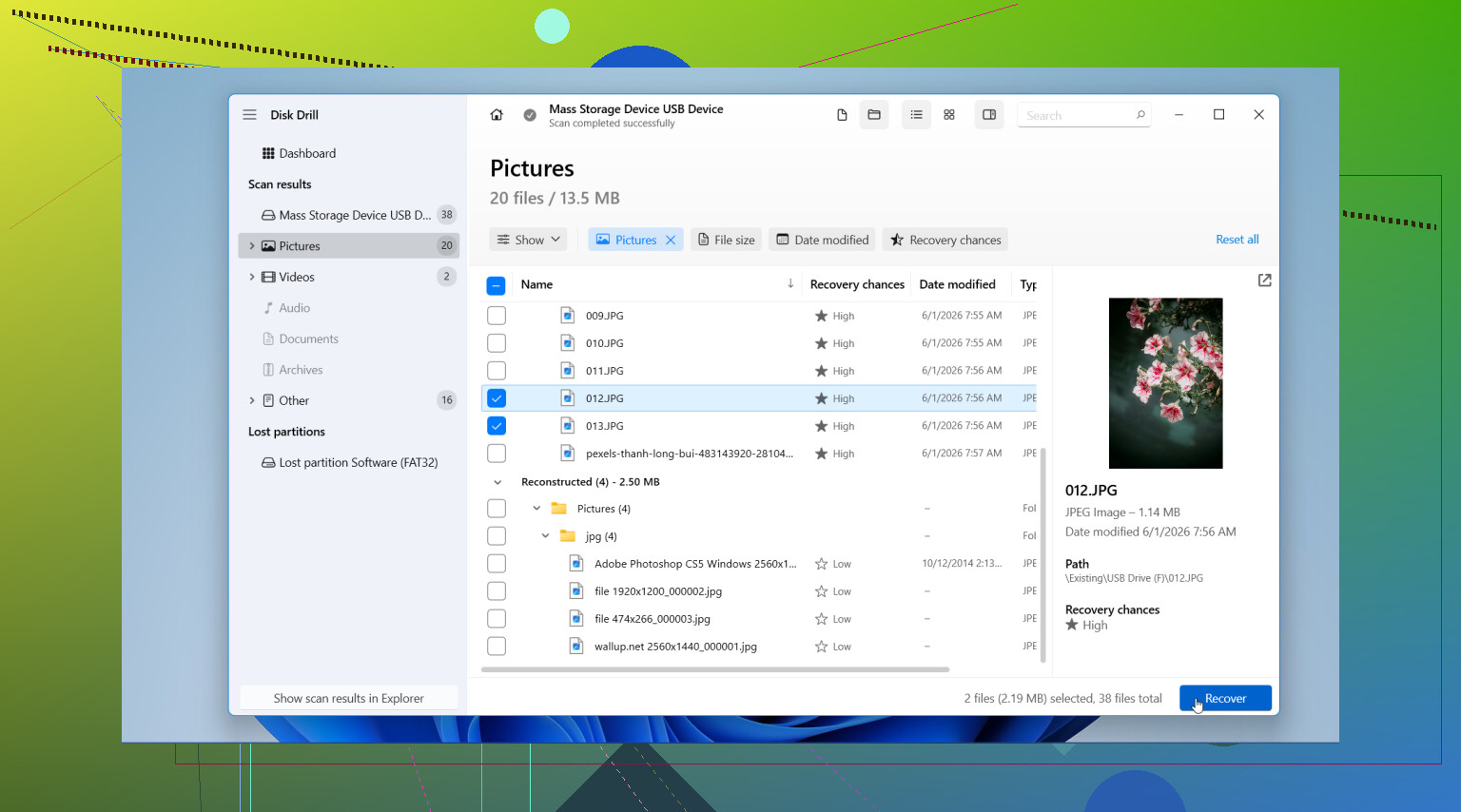
- Disk Drill: This is the one I’d start with if you want the least friction. The layout is easy to follow, previews are good, and it handles photo recovery from SD cards well. It also supports Canon RAW formats like CR2 and CR3, which matters if your missing files aren’t simple JPGs. On Windows, you get up to 100MB of free recovery, so you can test whether your files show up before spending money.
- PhotoRec: This one is free and open source. It works, and I’ve seen it pull files from cards people thought were dead. The catch is the interface feels old and text-heavy, and you usually lose original file names. If you don’t mind a rougher setup, it’s solid.
The recovery flow
This part is simple, but people still trip over it.
- Install the software on your computer. Do not put it on the SD card you’re trying to recover from.
- Insert the card with a card reader and scan it. Big cards take a while. Let it run.
- Filter results by images. Preview files before restoring them. This saves time and helps you avoid junk files or broken thumbnails.
- Recover files to a different drive. Save them to your computer’s internal drive or another external disk. Do not write recovered data back to the same SD card. I did see someone do this once. Total mess.
After you get the files back
Once the photos are safe and copied somewhere else, then format the card in the camera before using it again. That tends to keep the file system clean. Until recovery is done, leave the card alone. Seriously, this is one of those times where doing less is the smart move.

1 Like
If the card matters, I’d make an image of it first. @mikeappsreviewer covered the no-write part well. I disagree on one small point, plugging the camera in by USB is not always bad. Some Canon bodies expose the card read-only enough for recovery. Still, a quality reader is faster and less flaky.
My order:
- Clone the SD card with something like USB Image Tool or ddrescue.
- Run recovery on the clone, not the original.
- Try Disk Drill first for preview support, especially if you shot CR2 or CR3.
- If file names matter less than raw recovery rate, try R-Studio or PhotoRec after that.
Why clone first? If the card has weak sectors, one long scan can push it over the edge. A clone gives you repeat tries. Labs do this for a reason.
If Disk Drill finds full-size previews, your odds are decent. If you only see broken thumbnails, parts were overwritten. Also check for sidecar files and video cache if you shot bursts.
This is a decent quick explainer too, how to recover deleted photos from an SD card.
Do not save restored files back to the same card. Sounds obvios, people still do it.

If the photos were only deleted and not overwritten, your odds are still pretty decent. @mikeappsreviewer and @jeff already covered the big “stop using the card” rule, so I’ll add the part people skip: check whether the files are actually hidden by a messed-up file table before doing deep recovery.
On Windows, plug the SD card in and see if the card still shows the used space. If the card says, for example, 20GB used but you “can’t see” the photos, that sometimes means the images are still there and the directory is what got borked. In that case, tools that rebuild the file system can help before full carving. I’d try Disk Drill first because it shows both deleted files and reconstructed ones in a way that’s easier to sort through, esp if you shot Canon RAW + JPG together.
One tiny disagreement with the clone-first crowd: if the card is healthy and mounts normally, cloning is great but not always required for a simple accidental delete. If the card is acting weird, disconnecting, or throwing read errors, then yeah, clone first no question.
Also, if this was an SDXC card and you used it in multiple devices, check for a hidden DCIM copy or import cache on your computer/photo app. Sounds dumb, but I’ve seen ppl “recover” files that were already imported.
If software finds only thumbnails, the full-res images probably got partially overwritten. If the photos are truly irreplaceable, stop DIY after the first pass and consider a recovery lab.
For extra reading, this thread on Canon camera SD card photo recovery tips is worth a look too.
One angle I’d add to what @jeff, @cacadordeestrelas, and @mikeappsreviewer said: check whether your Canon wrote dual-format pairs like RAW+JPEG. Sometimes one survives even when the other looks gone, and recovery apps hide that unless you filter by extension. So search specifically for CR2, CR3, JPG, MOV, MP4 instead of just “photos.”
I slightly disagree that a normal accidental delete always needs the full clone-first ritual. If the card reads cleanly and you have zero signs of hardware trouble, a read-only scan is usually fine. But if the card drops connection once, gets slow, or throws errors, stop and image it.
Disk Drill is a reasonable first pass because previews help a lot.
Pros
- Easy to sort recovered Canon files
- Good preview support for many photo types
- Friendly if you are not used to recovery tools
Cons
- Deep scans can return lots of junk
- Original folder structure/file names may not fully come back
- Free recovery limits depend on platform
If Disk Drill shows full-resolution previews, that is the best sign. If not, try a second tool with a different recovery method. Also, check Lightroom, Canon software, Windows Photos, or macOS Photos import caches before doing anything more aggressive. A surprising number of “deleted” shots were already imported once.